
Blog
Building AI Infrastructure for an Engineering Firm: The Complete Data Architecture
AI at an engineering firm needs a connected data layer linking Operations, Accounting, HR, Sales and Marketing so data flows without manual handoffs.
QUICK ANSWER
Most engineering firms fail with AI not because they chose the wrong tool, but because they have no data infrastructure connecting their departments. Before you add any AI system, you need to map how information flows between your five core departments, Operations, Accounts, HR, Sales, and Marketing, and build the roads that let it move automatically. That is what makes AI actually work at scale inside an engineering firm.
Why AI Is Underperforming at Most Engineering Firms
Everyone in the engineering industry is asking some version of the same question right now: We bought the AI tools. Why isn’t anything changing?
The answer is usually not the tools.
At Modern Engineering Solutions, we get this question regularly, from recruits, from other firms, from clients. How are you actually using AI to reduce administrative overhead for your engineers? What does that look like internally?
The honest answer is that it starts with something most people overlook entirely: your data infrastructure.
AI does not create intelligence. It amplifies whatever you hand it. If you hand it five disconnected department systems that never talk to each other, you get faster silos. If you hand it a structured, connected data layer where every department feeds into the same network, you get a firm that compounds.
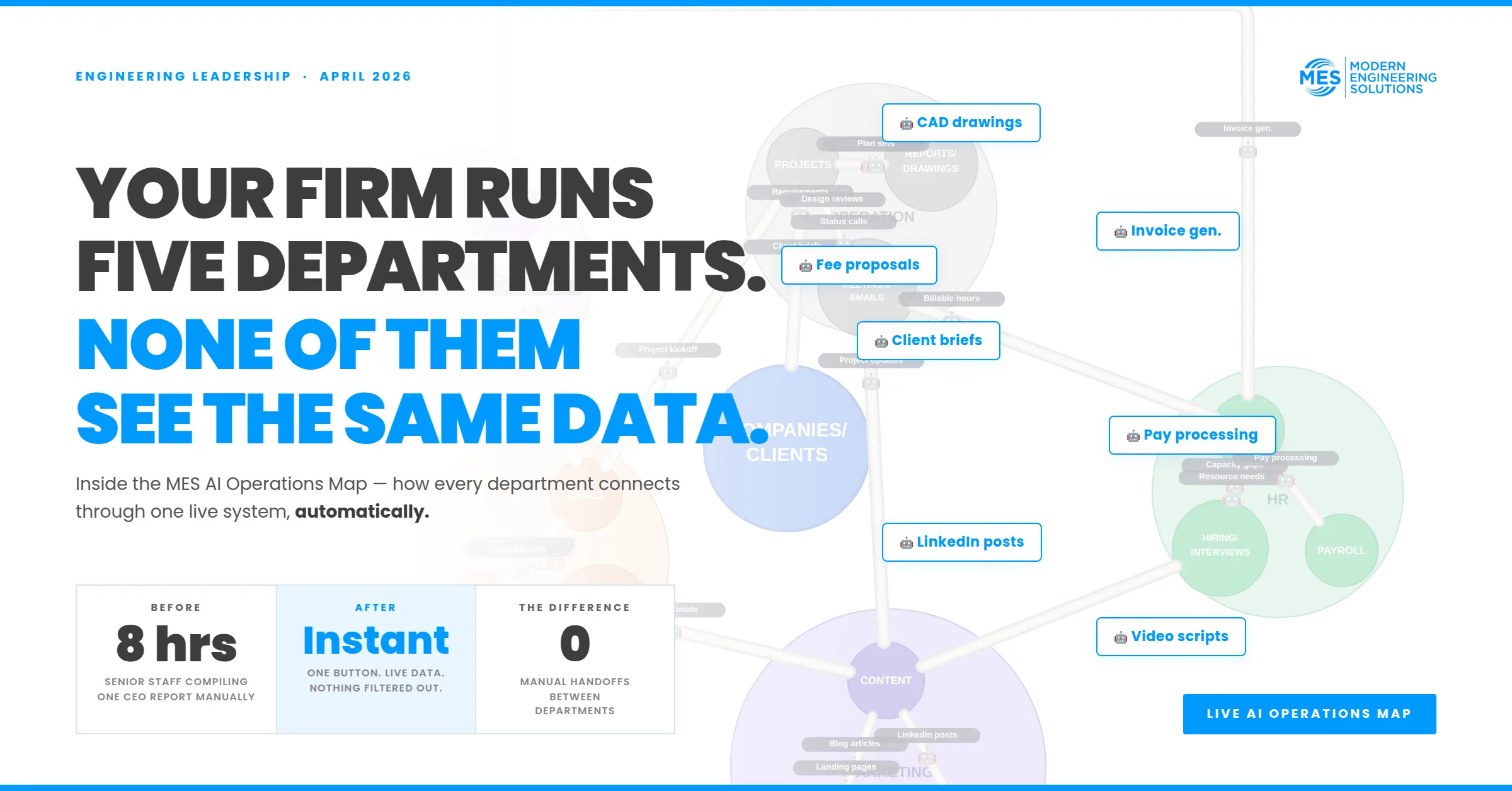
The visual we built internally to explain this is what we call the relational database, or the MES AI Operations Map. This article walks through exactly how it works and the three use cases that have had the biggest impact on how we operate.
The Five Departments Every Engineering Firm Runs
Before you can build AI infrastructure, you need to acknowledge what you are actually working with. In any engineering firm, regardless of size, there are five core operating groups.
Operations is the heart of the business. Engineers, EITs, architects, and drafters delivering projects. This is where the technical work happens and where the majority of your billable activity lives.
Accounting handles invoices, payments, revenue tracking, and financial reporting. Every dollar in and out of the firm flows through here.
HR manages timesheets, payroll, hiring, and onboarding. This is also where interview transcripts and candidate data live, which most firms never think to use.
Sales is where proposals are built, deals are signed, and client relationships are tracked. In smaller firms this is often the principal doing everything, but as you grow it becomes a distinct function.
Marketing supports proposals, creates outbound content, manages social media, and builds the brand visibility that attracts clients and recruits.
In most engineering firms, each of these five groups runs its own system. Sales has the CRM. Operations has project files. HR has timesheets. Accounting has invoices. Marketing has no system at all. None of these talk to each other without a human manually transferring information between them.
That manual transfer is the cost you are paying that nobody has named yet.
The Road Network Model: How AI Moves Through Connected Data
Think of your data infrastructure the way you think about a road network. AI moves along that network to find what it needs. If the roads exist and are mapped correctly, the system can travel from any point to any other point without friction. If the roads do not exist, the AI is driving blind, regardless of how capable the model is.
The visual we built at MES shows five department hubs connected through a central Companies/Clients node. Every department has sub-nodes (projects, invoices, timesheets, deals, content, hiring) and every connection between them is a live data highway that AI agents move through automatically.
When the map is built correctly, information generated in one department becomes useful data for every other department, without anyone sending an email or updating a spreadsheet.
Use Case 1: Invoice Descriptions Generated Automatically
This is the one that surprises people the most.
Your accounting team sits down at the end of the month to write invoice descriptions. They need to justify what was billed on Project 35. Usually they are working from memory, or from whatever notes someone remembered to write.
If your data is connected correctly, the AI does not need memory. It reads what actually happened.
Project 35 has a project number. That number is tagged to every email, every Teams message, every meeting transcript, and every timesheet entry associated with it. The AI goes and reads all of that. It summarizes the month’s activity, identifies the key work items, and generates invoice descriptions in the billing style you have already established.
You will be surprised what it remembers from the first few days of the month that your engineers were not even writing notes on to justify. It was in the emails. It was in the meeting transcripts. It was in the timesheet descriptions.
You can also automate this entirely. Set up a monthly trigger: invoice creation time for active projects. The system identifies active project numbers, pulls calls, emails, Teams messages, and timesheets, summarizes them, and drops the descriptions into your billing format.
The before and after:
Use Case 2: Hyper-Customized Content from Project Data
Most engineering firm content sounds generic because it is. It was written by someone who was not on the project, working from a two-paragraph summary.
When your operations data is connected to your content system, the AI can pull the actual story.
Say you want to create a video or LinkedIn post about lift stations. You search your project database for every project tagged with lift station. The AI pulls the calls, the meeting transcripts, the field notes, and the technical reports associated with those projects. Now it can write content that includes the specific challenges your team faced, the approach you took to solve them, and the outcome you delivered. That is a perspective no competitor can replicate because it came from work you actually did.
The content is hyper-customized because it is pulling from hyper-specific data. The AI is not inventing case studies. It is summarizing what your engineers said in meetings and what your project files show.
Use Case 3: Proposals Written in the Client’s Voice
This is the use case with the highest direct revenue impact.
When a prospect moves through your sales process, they generate data. Scoping calls. Email threads. Meeting transcripts. Notes about what they care about, what their timeline is, what their budget concerns are. All of this ends up somewhere, usually scattered across a CRM, a notes app, and someone’s memory.
If you connect your CRM data to your proposal generation system, the AI can write a proposal in the actual language your client used when they described what they wanted. Not a template with the company name swapped in. A document that references the specific scope items they mentioned on the scoping call, uses the terminology they used, addresses the concerns they raised, and mirrors the communication style they showed in emails.
You provide the sample proposals you have already written as a format reference. The AI reads the CRM notes, the call transcripts, and the sample, and produces a first draft that meets the client where they are. Your proposal writer then refines it rather than starting from scratch.
The executive summary hits the scope items they said they wanted. The approach section reflects how they described their problem. The result feels like the proposal was written for them specifically, because in a meaningful sense, it was.
Bonus: Using Hiring Interview Transcripts as Market Research
This one is not in most firms’ playbooks yet.
When you record hiring interviews and store those transcripts in your HR system, you are building a database of what engineering candidates actually care about. Not what you assume they care about. What they are literally asking about in every single interview.
Right now, in 2026, candidates are asking about AI in almost every engineering interview. What tools are you using? How is your firm adapting? What does that look like for my day-to-day work?
If your interview transcripts are connected to your content system, the AI can pull the three questions candidates ask most frequently across every interview in the last six months and tell you exactly what your market is thinking. You can then build recruiting content that addresses those questions directly, without ever asking candidates to complete a survey.
How We Built This at MES: The Sequence That Works
Before we wrote a single line of code, we mapped every connection by hand.
Which department needs what from which other department. Where data is created and where it needs to go. Where information was dying in a manual handoff instead of flowing through automatically. That map became the blueprint.
Then we built it using Claude Code, a full-stack application covering HR, time tracking, KPIs, content generation, report writing, and CRM, with AI agent workflows running across every connection. Working system in ten days. Updates in minutes, not quarters. No platform sprawl. One operating system. One data layer.
The sequence that works: map the connections first, build the roads, then put the AI on them. Most firms try to do it in reverse and wonder why nothing sticks.
Frequently Asked Questions
What is AI infrastructure for an engineering firm?
The structured data layer that connects your firm’s departments, Operations, Accounting, HR, Sales, and Marketing, so AI systems can access and act on information across all of them automatically. It is the foundation that makes AI tools actually useful beyond single-task prompting.
Do I need a custom-built system to do this?
Not necessarily. The key is structured, connected data. Some firms can achieve this by properly integrating existing tools like a CRM, a project management platform, and an accounting system with AI middleware. Others benefit from a custom application built with tools like Claude Code. The right path depends on your firm’s size, budget, and how much control you want.
How long does it take to build this kind of system?
At MES, the first working version took ten days using Claude Code. Iteration and expansion are ongoing. The key is starting with a clear map of your data connections before writing any code.
Can small engineering firms (under 20 staff) do this?
Yes, and smaller firms often benefit more because the administrative overhead per engineer is higher when the team is lean. The five-department model applies regardless of firm size.
What tools did MES use to build its AI operations system?
MES used Claude Code to build a custom full-stack application covering CRM, HR, timesheets, KPI tracking, content generation, and report writing. Open-source packages from GitHub provide many of the building blocks.
Related Resources
Keep reading
More to read.
Talk to an engineer
Tell us about your project.
An engineer reads it
Not a salesperson. Someone who can tell you whether the pathway is real.
You get a first answer
Your options, the agencies involved and the questions that decide cost and schedule.
You decide
No commitment to have the first call.
Prefer the phone? (214) 833-6748